Free Download Your Desired Softwares and Apps From GetintoPC
ixBrowser 2026 Free Download
ixBrowser 2026 Free Download Latest Version for Windows. It is full offline installer standalone setup of ixBrowser v2.7.23.
ixBrowser 2026 Overview
ixBrowser 2026 is an anti-detect browser designed for use by those who manage multiple accounts (Multi-Accounting) in the affiliate marketing field and/or for data scraping. It is different from typical browsers in that it mainly serves the function of enabling its users to operate more than one unique browser profile at once (rather than operate only one profile) and avoiding the detection of the user’s true identity while connected via the Internet. Its purpose is to prevent websites and other online platforms from tracking all of a user’s accounts using browser fingerprinting technologies.
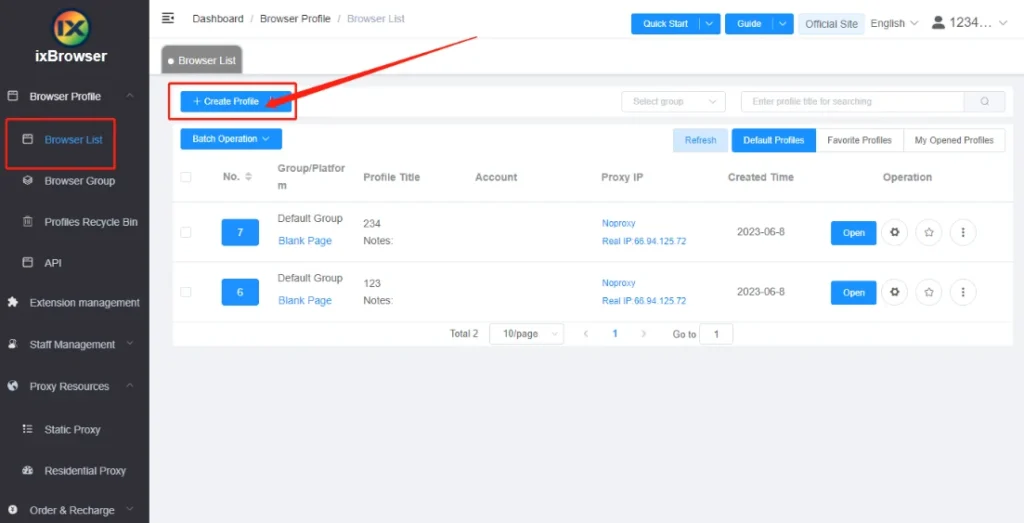
ixBrowser is based on a technology that isolates the digital fingerprint, the original digital identification of a user. When a user creates a profile with the ixBrowser, the software will be able to customize or modify any hardware and/or software identifiers the website uses to identify the user (browser). The information settings that can modified to prevent being tracked by the user’s true identity include: User Agent, Canvas fingerprinting, WebGL, WebRTC, Audio Context, Timezone, and Geolocation. Each profile will be displayed as if it were a separate device when viewed by an external server (website), thereby alleviating some of the risk of having More than one account per person being banned from sites like Facebook, Amazon, eBay, TikTok, etc.
It is based on the open-source Chromium Engine, which provides compatibility with the majority of Chrome Extensions and web standards in general. A significant difference between ixBrowser and others in the anti-detect market is that ixBrowser can be downloaded free of charge and does not limit the number of profiles a user can use.
Whats New in ixBrowser 2026 (v2.7.23)
- The Proxy Detection feature is now included in the Profile List batch operations.
- In Software Settings > Cache Management > Clear Cache, the new option “Keep extensions and their associated data” has been added.
- The synchroniser has added a hotkey for launching the simulated input interface.
- Fixed an issue where using other access gateway lines for a long duration would return to line 1.
- Fixed a problem with the API that caused it not to identify profiles with an SSH proxy binding.
- Fixed a problem where the number of profiles per row parameter in the custom layout was not working in open browsers.
- Fixed an issue that caused API request limitations not to be deducted in certain circumstances.
Key Features
- Unlimited Browser Profiles: Create separate, isolated browser environments for different accounts.
- Advanced Fingerprint Control: Customize digital fingerprint parameters (UserAgent, WebRTC, WebGL, timezone, language, fonts, proxies) to reduce platform detection risk.
- Team Collaboration: Share profiles and proxies with team members and assign permissions; supports multi-role operations.
- Cloud-Stored Profiles: Profile data stored on cloud servers for secure access and recovery.
- Batch Operations: Create, edit, copy, export, and open profiles in bulk for efficient workflows.
- Extension Support: Supports Chrome Web Store extensions for added functionality. ([turn0search0]
- Proxy Integration: Can manage proxies (including third-party services) and bind them to individual profiles for privacy/isolation.
ixBrowser Specification
| Software Name | ixBrowser |
| Version | v2.7.23 |
| Developer | ixBrowser |
| Category | Anti-Detect Browser / Multi-Account Browser & Web Automation Tool |
| Supported Platforms | Windows (desktop application with cloud-profile sync and team support) ([turn0search0](#turn0search0)) |
| License / Pricing |
|
| Typical Use Cases |
|
| Security & Privacy Notes |
|
| Known Issues / Reviews |
|
ixbrowser VS Gologin 2026
| Feature | IXBrowser | GoLogin |
|---|---|---|
| Purpose | Anti-detect browser designed for managing multiple browser identities and online accounts | Anti-detect browser focused on privacy, multi-account management, and digital marketing workflows |
| Browser Engine | Chromium-based browser environment | Chromium-based browser with customized fingerprints |
| Fingerprint Protection | Provides browser fingerprint customization and protection | Advanced fingerprint masking including browser, device, and network parameters |
| Multiple Account Management | Supports creating and managing multiple browser profiles | Strong multi-account management with isolated browser profiles |
| Profile Isolation | Each profile works as a separate browser identity | Each profile has independent cookies, fingerprints, and settings |
| Team Collaboration | Offers profile sharing and team management features | Includes team access, profile sharing, and permission controls |
| Proxy Support | Supports various proxy types for different profiles | Supports HTTP, HTTPS, SOCKS5 proxies and proxy management |
| Automation Support | Can work with automation tools for account workflows | Supports automation integrations and API access |
| User Interface | Simple interface focused on profile management | User-friendly dashboard with detailed profile controls |
| Performance | Lightweight and suitable for managing multiple profiles | Optimized for running multiple isolated browser sessions |
| Best For | Users needing affordable multi-profile browser management | Marketers, agencies, affiliate managers, and businesses managing many accounts |
| Pricing | Generally positioned as a budget-friendly anti-detect browser option | Usually considered a premium anti-detect browser solution |
| Ease of Use | Easy for beginners managing multiple accounts | Beginner-friendly with more advanced options for professionals |
| Overall Rating | Good choice for users looking for cost-effective profile management | Better choice for professional teams requiring advanced features |
System Requirements for ixBrowser 2026
| Component | Requirement |
|---|---|
| Operating System | Windows 7, Windows 8, Windows 8.1, Windows 10, or Windows 11 (desktop version available) ([ixbrowser.com](https://ixbrowser.com/en?utm_source=chatgpt.com)) |
| Processor (CPU) | Modern Intel or AMD processor (multi-core recommended for multiple profiles) |
| Memory (RAM) | 4 GB minimum; 8 GB or more recommended when running many profiles |
| Storage / Disk Space | At least 500 MB free space for installation and profile data |
| Internet Connection | Required for installation, profile sync & cloud features |
ixBrowser 2026 Free Download
Click on the link below to start the ixBrowser 2026 Free Download. This is a full offline installer standalone setup for Windows Operating System. This would be compatible with both 32 bit and 64 bit windows.


