Free Download Your Desired Softwares and Apps From GetintoPC
Double Driver 4.10 for Windows
Double Driver 4.10 for Windows Free Download Latest Version. It is full offline installer standalone setup of Double Driver.
Double Driver Overview
Double Driver is a lightweight program created by BooZet Freeware that allows you to back up and restore your hardware drivers on your Microsoft Windows workstation. Unlike other similar utilities, Double Driver does not require an installation process to work, which makes it very convenient to be carried on USB diagnostic drives. The main goal of Double Driver is to make the driver management process more efficient and less stressful when re-installing your operating system by offering a simple way to archive existing driver settings.

Double drivers work by scanning the host PC for all of the installed drivers. One very useful aspect of the Double Drivers scanning engine is that it can filter the results to show only non-Microsoft drivers, meaning that it excludes all generic drivers that come with Windows. Therefore, when backing up and restoring your drivers, double drivers will greatly reduce the time and space that would otherwise be required to perform the backup, since it ignores all of the generic Windows drivers.
Once the desired drivers are identified, Double Driver allows users to export the selected drivers into a hierarchy of organized folders, a ZIP file or a self-extracting executable. By storing the drivers in this organized manner, it enables users to simply run the “Scan for Hardware Changes” function from Windows Device Manager, and quickly find their backing up file path. Although Double Driver has a much more significant focus on driver backup than it does on performing live updates, Double Driver does also provide a robust amount of detail on each driver that is stored in the original driver image file.
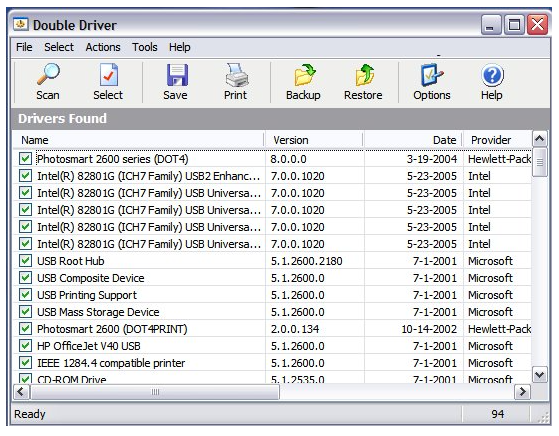
Double Driver Features:
- Intelligent Driver Analysis automatically scans the system and produces a list of drivers on the machine, and highlights all non-Microsoft (third-party) drivers by default, so that you can easily see what drivers will be backed up to avoid backing up duplicates of the same operating system files.
- Multiple Backup Modes: Different modes of backing up files, such as copying the files into a directory structure.
- Offline System Scanning can back up and restore drivers from a Windows installation that is not booted to, which may be on a different hard drive or external partition. Essential for data recovery.
- One-Click Restore Wizard saves users time when restoring drivers from a previous backup by selecting one or multiple drivers with a single click, instead of going through Device Manager for manual installation.
- Portable Application: Does not require installation to run; it requires only a few small files that can run directly from a USB flash drive. An advantage of this is that it is helpful to IT Techs who may work with numerous computers.
- Comprehensive Driver Information allows users to print or save driver information for each driver, including version number, date, provider name, and hardware ID, for inventory purposes.
What’s new in Double Driver 4.1.0:
- Ability to resize main dialog
- Fixed: false positive from Avira (dd.dll)
- Option to by-pass elevated mode
Technical Details
| Feature | Details |
|---|---|
| Developer | Budy Setiawan Kusumah |
| OS Support | Windows 10, 8, 7, Vista, XP (32-bit & 64-bit) |
| License | Free (Freeware) |
| Portability | Portable, no installation required |
| Backup Formats | Structured folders, compressed (zipped) folders, self-executable (.exe) files |
| Driver Types | Scans and lists non-Microsoft (third-party) drivers |
| Functionality | Backup, Restore, List, and Print driver details |
| Information Displayed | Driver Name, Version, Date, Provider, Hardware ID |
| CLI Support | Yes, available in GUI and Command Line Interface |
| Restore Capability | Restores drivers from previous backups via .inf files |
System Requirements for Double Driver
| Component | Minimum | Recommended |
|---|---|---|
| Operating System | Windows XP / Vista / 7 / 8 / 8.1 / 10 / 11 (32-bit & 64-bit) | Windows 10 or Windows 11 (64-bit) |
| Processor (CPU) | Any Intel/AMD compatible processor | Dual-core 2 GHz or better |
| Memory (RAM) | 512 MB RAM | 2 GB RAM or more |
| Storage / Disk Space | ~10 MB free space | 100 MB free space (for backups) |
| Display | 800 × 600 resolution | 1024 × 768 or higher |
| Internet Connection | Not required | Optional (for downloading updated drivers) |