Free Download Your Desired Softwares and Apps From GetintoPC
TypingMagic 12 Free Download
TypingMagic 12 Free Download Latest Version. It is full offline installer standalone setup of TypingMagic 12 from getintopc.
TypingMagic 12 Overview
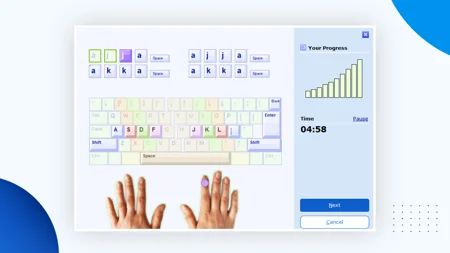
TypingMagic 12 is a Windows-compatible application that teaches touch typing through lessons of more than ten hours. It is for all experience levels and uses structured lessons to help improve typing speed and accuracy. TypingMagic has an adaptive learning engine that continuously evaluates the performance of the user during each exercise. The engine analyzes both weak keys and key combinations with poor performance, and provides a user with custom review drills designed for practice on these identified weak areas.
The TypingMeter widget, introduced in TypingMagic 12, is an always-running background application that monitors online typing performance across other daily applications. The widget collects user-generated local data to display detailed bigram counting information and heat maps, to give users an understanding of their practical typing habits, in addition to what they learn in their lessons. This software supports many different types of keyboard layouts, including QWERTY, AZERTY, Dvorak, Colemak, and several non-Latin layouts such as Hindi, Bengali, Tamil, and Thai. In addition to its advanced skill tests with printable digital certificates, TypingMagic also has gamified interactive typing drills and an updated user interface that now includes Dark Mode as a selection option.
How TypingMagic 12 Software Works?
This program operates inside an active user session. The primary function of this program is to work as an interactive and visible graphical application on your computer. However, this program also includes a secondary component known as the TypingMeter, which is a lightweight, background application that monitors your real-time keyboard use, such as when you are using any third-party application (like email clients or browsers), by listening to the standard Windows keyboard input APIs. The program does not send any keyboard information (raw text) or other types of data collected to any external servers. It simply keeps track, mathematically, of how fast you typed each character of the alphabet and how long you paused between character pairs (bigram hesitations).
All data segregation strictly follows modern Windows directory allocation. The primary static application binaries are written to C:\Program Files (x86)\TypingMaster. User-specific analytics, heat maps, and localized application logs are written natively to %LOCALAPPDATA%\TypingMaster\.
What’s new in this version
- More Lesson Material
- TypingMeter Bigram analytics with heat maps
- Dark Mode and improved performance
- TypingMeter Widget
- Updated User-Interface
- More Typing Tests
- More Typing Games
- New built-in keyboard layouts: Hindi, Bengali, Tamil, Khmer, Thai, Vietnam, Colemak
- Universal Course supports any layout, including custom ANSI/ISO keyboards
- Unicode support for non-Latin scripts and user names
Technical Specifications
| Technical Detail | Information |
|---|---|
| Software Name | TypingMagic 12 |
| Version | 12.0.950 |
| Release Date | February 2, 2026 |
| File Name | TypingMagicSetup.exe |
| Setup Size | Approximately 9.9 MB to 12 MB |
| Setup Type | Offline Installer / Microsoft Store App |
| Compatibility | Windows 8, Windows 10, and Windows 11 (Compatible with Intel, AMD, and Windows on ARM devices) |
| Developer | Cloud Kayak Labs, Inc. |
| Category | Typing Tutor, Keyboard Training & Educational Software |
TypingMagic 12 Pros and Cons
Pros
- TypingMeter helps you analyze your daily typing habits. It creates personalized lessons for you based on the areas that need improvement.
- provides Works offline feature so you can keep your typing data and practice sessions private.
- Uses very little processing power, which makes it run well on older computers and low-end machines.
- Provides structured lessons, an efficient tracking system, and exercises to help build skills for all levels of user.
Cons
- There are many features offered by this typing tutor that require you to upgrade to the paid version after your trial period expires (e.g., custom text to practice on).
- The interface looks a little outdated compared to newer web-based typing programs.
- All of your progress is stored locally on your computer, which means you cannot automatically sync with any other devices.
- It may be difficult for some users to switch back and forth from one computer to another because of the limited amount of cloud integration available.
System Requirements
- Available on: PC
- OS: Windows 10 version 0.0 or higher
- Keyboard: Integrated Keyboard
- Mouse: Integrated Mouse
- Memory: 2 GB (Minimum), 4 GB (Recommended)
TypingMagic 12 Free Download
Click on the link below to start TypingMagic 12 Free Download from getintopc. This is a full offline installer standalone setup for Windows Operating System. This would be compatible with both 32 bit and 64 bit windows.